A prvalue is not a temporary


This is part one of a series of blog posts on temporaries, copies, return value optimization, and passing by value vs. reference.

A good place to start, and the point of this first article, is how a prvalue isn’t necessarily a temporary.

If you’re entirely new to value categories (lvalues, rvalues etc.), you might want to read lvalues, rvalues, glvalues, prvalues, xvalues, help! first.

lvalues vs rvalues

An lvalue is an expression that can not be moved from. An rvalue is an expression that can be moved from.

Let’s first have a look at lvalues. Given this variable v:

std::vector<int> v{1,2,3};

If I now write the expression v somewhere, v is referring to an actual variable. I can’t just move from it, as it would mess up an existing object that someone else could still be using. We call an expression like this an lvalue.

For instance, if I pass my existing vector to a function useVector:

useVector(v);

Here, the expression v is an lvalue, and useVector can’t move from it. After all, someone might want to keep using v on a following line.

But if I know I won’t be needing v anymore, I can turn it into an rvalue, by wrapping it in std::move:

useVector(std::move(v));

Here, the expression std::move(v) is an rvalue. useVector would now be allowed to move from v. (And I must take care to not use v again, since it might have been moved into useVector.)

rvalues: xvalues vs prvalues

Here’s another way to get an rvalue:

useVector(std::vector{1,2,3});

Here, the expression std::vector{1,2,3} is also an rvalue, and again useVector would be allowed to move from it.

Notice, however, that these are two different types of rvalues. std::move(v) takes an existing object and casts it to an rvalue. That type of rvalue is called an xvalue, or “eXpiring lvalue”.

On the other hand, std::vector{1,2,3} is a prvalue, or “pure rvalue”. Unlike an xvalue, this expression never referred to an existing object in the first place. People sometimes call this “a temporary”, but, as is the main point of this article, that’s not necessarily true.

A prvalue in itself is not a temporary. A prvalue is not an object. A prvalue just represents “the idea of the object”, and only turns into a temporary when it absolutely needs to. For instance:

std::vector v = std::vector{1,2,3};

Here, the prvalue std::vector{1,2,3} does not turn into a temporary that is then used to initialize v. Rather, the prvalue is used to initialize v directly, just as if you’d written std::vector v{1,2,3};. No extra temporary is created, and no copies or moves are performed.

Similarly:

void useVector(std::vector<int> v);

useVector(std::vector{1,2,3});

Here, useVector takes its parameter by value. std::vector{1,2,3} never turns into a temporary, the prvalue expression is instead used to initialize the parameter v directly, just like in the previous example. No extra temporary is created, and no copies of moves are performed.

Temporary materialization

However, if useVector takes its parameter by reference:

void useVector(const std::vector<int>& v);

useVector(std::vector{1,2,3});

Now, the reference parameter v needs some object to bind to, and std::vector{1,2,3} actually turns into a temporary object that v can bind to. This is called “temporary materialization”.

Return values

A function call that returns by value is also a prvalue 1. So, given this definition of getVector() and a call to it:

std::vector<int> getVector();

std::vector<int> v = getVector();

Here, the call getVector() is a prvalue which initializes v directly. There is no temporary that is then copied/moved into v. (There might be a copy involved in the return statement inside getVector(), but that’s a story for the next article.)

Conclusion

The point is that a prvalue only materializes into a temporary as a very last resort, avoiding unnecessary copies or moves. Until it needs to materialize, it only represents “the idea of the object”, i.e. what the object would be when it materializes into a temporary or is used to initialize something.

It is important to note that this has nothing to do with optimization. There is no temporary std::vector to optimize away in the first place, there’s just the prvalue, just the “idea of the object”. And then that idea of an object can materialize into an actual object if needed.

Footnotes

  1. §expr.call¶13: “A function call is an lvalue if the result type is an lvalue reference type or an rvalue reference to function type, an xvalue if the result type is an rvalue reference to object type, and a prvalue otherwise.” ↩︎

A taxonomy of C++ types


You may have heard of things like fundamental types, built-in types, basic types, integral types, arithmetic types, and so on. But what do they all mean, if anything?

In this post I’ll gradually build up the hierarchy of C++ types, eventually arriving at a big tree like in the following figure. But I promise we’ll take it easy and gradually, so it all makes sense in the end.

Intentionally unreadable for now, just to show the structure

Woha, that’s a lot! Let’s start with something seemingly simple, like ints.

Integer types

There are five standard signed integer types: “signed char“, "short int“, "int“, “long int“, and “long long int“. The implementation is also allowed to define an arbitrary number of implementation-defined extended signed integer types such as GCC’s __int128.

Together, the standard and extended signed integer types are called the signed integer types. Let’s visualise this:

For each of the standard integer types, there exists a corresponding (but different) standard un-signed integer type. These are “unsigned char“, “unsigned short int“, “unsigned int“, “unsigned long int“, and “unsigned long long int“. And similarly, for each of the extended signed integer types that the implementation defines, it has to define a corresponding extended unsigned integer type. For example, GCC defines unsigned __int128 corresponding to __int128.

Together, the standard and extended unsigned integer types are called the unsigned integer types. Let’s visualise these too, and notice the correspondence to the previous figure:

If we throw in “bool” and the character types “char“, “wchar_t“, “char8_t“, “char16_t“, and “char32_t“, we have all the integral types, also known as the integer types. (Character types have some further subdivisions that are best postponed to a separate blog post.)

Note, by the way, that you can click on all figures in this blog post to expand them.

Floating-point Types

That’s it for the integral types, now for the floating point types. Luckily, this is much simpler, since there’s only “float“, “double“, and “long double“, and they’re all signed. So there are only three standard floating-point types. Then, just as for the integral types, the implementation is allowed to defined extended floating-point types. So collectively we have these floating-point types:

Arithmetic and Fundamental Types

Collectively, the integral and floating-point types form the arithmetic types. Throw in void and std::nullptr_t, and we have all the fundamental types (remember that you can click to expand figures):

This is a good time to ask “But what about built-in and basic types?”. Those are terms that get thrown around in conversations and articles every now and then, but they don’t have an official meaning and are best avoided.

It’s understandable, however, that people refer to the fundamental types as “basic”, since they are indeed very basic compared to other types. They are “just an int”, “just a float” etc. Basically uncomplicated numbers with no additional semantics.

(Note that the term “basic type” was, in fact, used accidentally in a note (but never defined) in the standard until my PR #7287, and should be gone in C++26.)

Compound Types

So if the fundamental types are the simple, basic ones, what are the rest? The rest of the types are the compound types. The word “compound” normally means “made up of two or more parts”, so it makes sense that you find classes, unions, and arrays in this category. However, you also find enums, pointers, references, and functions in this category. I’m not sure why they chose “compound” for these, but that’s the name we have for “all the other types”, or the “non-fundamental types”:

Scalar Types

Finally, I need to mention scalar types, also shown in the diagram above. Luckily for us, no new types are introduced here, scalar types is just a grouping of types we’ve already discussed. The scalar types are all the arithmetic types, plus enums, pointers, and std::nullptr_t.

The reason I bring up scalar types here is that that’s how a memory location is defined in the standard. A memory location is either a scalar type or some bit-field stuff I want to skip for this article. Memory locations are fundamental to understanding the C++ memory model and multi-threaded programming.

Further reading

When writing this post, I considered bringing up integer promotions, conversion and the usual arithmetic conversions, but decided that the post is already long enough. Shafik Yaghmour has a nice post about The Usual Arithmetic Confusions that you might want to check out.

Why we probably shouldn’t have constexpr conditional operator


The idea

I had a great idea. We have constexpr if, but no constexpr conditional operator. Time for a proposal?

Since we can do stuff like this:

if constexpr(cond) { foo; } else { bar;}

Wouldn’t it be cool if we could also do

cond ? constexpr foo : bar;

My motivation was that I had a std::variant visitor that was identical for all types except one. So instead of writing an overload set for std::visit, it was simpler to have one common lambda with a conditional inside. Something like this, which returns “int” for int and “other” for all other types in the variant:

std::visit([]<typename T>(T value) {
        if constexpr(std::is_same_v<int, T>)
        {
            return "int";
        }
        else
        {
            return "other";
        }
    },
    my_variant);

It would be nicer to write it like this with a conditional operator, but now we can’t use constexpr.

std::visit([]<typename T>(T value) {
        return std::is_same_v<int, T> ? "int" : "other";
    },
    my_variant);

So I had the idea of constexpr conditional operator, so I could write my lambda something like this:

std::visit([]<typename T>(T value) {
         return std::is_same_v<int, T> ? constexpr "int" : "other";
    },
    my_variant);

In this case, constexpr doesn’t actually make much of a difference. std::is_same_v is a constant expression no matter if you use the constexpr keyword or not, so the compiler optimises it equally well in either case. But at least we verify that the condition is actually a constant expression. If we mess this up, we get a compiler error.

But the most important advantage of constexpr if is that each branch only need to compile if that branch is taken at compile time. So you can do for instance

template<typename T>
int f(T t) {
    if constexpr(std::is_same_v<T, std::string>)
        return t.size();
    else
        return t;
}

and this will work both for int and std::string, even if the first branch wouldn’t compile for an int and the second wouldn’t compile for std::string. Remove constexpr above, and you’re in trouble.

As it turns out, this is exactly why constexpr conditional operator might not be such a good idea! Thanks to Daniela Engert who pointed this problem out to me.

The problem

if is a statement, it doesn’t have a type. The conditional operator however is an expression, and has a type!

You can’t assign the result of an if statement to something, it doesn’t have a type or result in a value. The conditional operator does however. And the type of the conditional operator is determined by a set of rules which find a common type for the two branches. For instance:

auto result = false ? std::optional<int>{2} : 0;

The two branches have the types std::optional<int> and int, respectively. The compiler now has to figure out what the type of the expression should be, by trying to form implicit conversion sequences from the first to the other, and vice versa. See [expr.cond] for details. Since one can implicitly convert an int to a std::optional<int>, but not vice versa, the type of the full conditional expression (and thus the type of result) is std::optional<int>.

If we introduced something like ? constexpr here, with the same semantics as if constexpr, suddenly one of the branches would be discarded. And we’d have to do that, since the whole point is that the branch not taken usually doesn’t even compile. So in the case above, the first branch would be discarded, and we’d only be left with the literal 0 which has type int. Left with only the int to deduce a type from, the type of the full conditional expression would now be int instead of std::optional<int>. And Daniela’s argument, which I agree with, is that it could be surprising if the type of an expression changed just by introducing or removing constexpr.

In comparison, remember that an if statement doesn’t result in a value, and doesn’t even have a type. If you want to do the same with an if, you first have to define the result variable, and there’s no way to do that upfront without explicitly deciding on its type:

std::optional<int> result;
if constexpr (false)
    result = std::optional<int>{2};
else
    result = 0;

Notice here that the type of the value we assign to result is still different based on the constexpr condition, but now there’s no surprise, the resulting type is always the same. Both branches have to result in a type implicitly convertible to std::optional<int>, if they’re ever instantiated.

A counter argument?

There is one final point that needs to be mentioned, where the types of two if constexpr branches actually do influence type deduction. This can happen when you have a function with an auto return type, and you return from inside the if constexpr. Here’s a demonstration with a function template, but it can also happen for regular functions:

template<bool b>
auto f()
{
    if constexpr (b)
        return std::optional<int>{2};
    else
        return 0;
}

The return type of f<true> is std::optional<int>, and the return type of f<false> is int. Isn’t this the same problem we just used to argue against constexpr conditional operator? It’s similar, but not the same. The big difference is that removing constexpr in this example doesn’t change the deduced type, it rather causes a compilation error. This is due to dcl.spec.auto#8, which is very strict about all non-discarded return statements having the same type, not just types that can be implicitly converted to a common type:

If a function with a declared return type that contains a placeholder type has multiple non-discarded return statements, the return type is deduced for each such return statement. If the type deduced is not the same in each deduction, the program is ill-formed.

dcl.spec.auto#8

Conclusion

For constexpr conditional operator, adding/removing constexpr could change a deduced type, which could be surprising. For constexpr if, this doesn’t happen.

What do you think? Should we have constexpr conditional operator or not?

Microsoft C++ versions explained


Microsoft has five different version numbers to think about when it comes to C++. Here’s an attempt to explain what they all mean.

  • Visual Studio release year (the “marketing version number”), e.g. Visual Studio 2022
  • Visual Studio actual version number, e.g. Visual Studio 17.0
  • Visual C++ (MSVC) version, e.g. MSVC 14.30
  • Toolset version, e.g. toolset 143
  • Compiler version, e.g. cl.exe 19.30

Visual Studio versions

What most people will see first is the Visual Studio release year. You’ll download Visual Studio 2022, Visual Studio 2019 etc. These however also have a more normal major.minor versioning scheme, and they bump the major version for every release year. So for instance VS 2017 is version 15, VS 2019 is version 16, and VS 2022 is version 17. Note that the year and the major version are not correlated in any way, except that Visual Studio 2010 just happened to also be version 10.

Visual Studio also has minor releases of each major version. Some examples (there are more minor releases per major than shown here):

Yearversion
Visual Studio 201715.0
15.3
Visual Studio 201916.0
16.1
Visual Studio 202217.0
17.1

source: Wikipedia

Visual C++ versions

Microsoft Visual C++, aka MSVC, ships as a part of Visual Studio, but has its own versioning scheme. Importantly, the major number signifies ABI compatibility, so something compiled with MSVC at one major version number can be linked against something compiled with any other MSVC at the same major version. (Some restrictions apply.) The MSVC major version number luckily gets bumped a lot less often than the Visual Studio version itself. As of Visual Studio 2015, they have kept the MSVC major version at 14. The first digit of the minor version seems to be bumped for each major version of Visual Studio itself. The Visual C++ version number is also used for the Visual C++ Redistributable.

Some examples:

VS YearVS versionMSVC version
Visual Studio 201715.014.1
15.314.11
Visual Studio 201916.014.20
16.114.21
Visual Studio 202217.014.30
17.114.31

source: Wikipedia

The linker (link.exe) also uses the Visual C++ version number as its version number, so e.g. for Visual C++ 14.32 I might see link.exe version 14.32.31332.0.

C++ toolset versions

Closely related to the MSVC version number is the C++ toolset version number. I can’t find a good source for it, but from Microsoft’s article it seems that the toolset version is made up of the MSVC major version and the first digit of the MSVC minor version. Some examples:

VS YearVS versionMSVC versionToolset version
Visual Studio 201715.014.1141
15.314.11141
Visual Studio 201916.014.20142
16.114.21142
Visual Studio 202217.014.30143
17.114.31143

Source: Microsoft

Compiler versions

Finally, there’s the compiler version, which is what cl.exe reports. E.g. 19.16.27048. The major.minor version scheme correlates with the _MSC_VER macro which you can check in your source code (godbolt). So e.g. cl.exe version 19.21 has _MSC_VER 1921. (I’ll be nice and count those as one version number.)

VS YearVS versionMSVC versionToolset versionCompiler version
Visual Studio 201715.014.114119.10
15.314.1114119.11
Visual Studio 201916.014.2014219.20
16.114.2114219.21
Visual Studio 202217.014.3014319.30
17.114.3114319.31

The _MSC_VER version number is incremented monotonically at each Visual C++ toolset update, so if you want to only compile some stuff if the compiler is new enough, you can do e.g. #if _MSC_VER >= 1930.

Appendix: Running out of version numbers

Interestingly, the scheme where they bump the first digit of the Visual C++ minor version for each major release of Visual Studio means that they can only have nine minor versions of MSVC per Visual Studio major version! And looking at wikipedia, it seems they actually ran out of toolset versions at the end of Visual Studio 2019 and reused 14.28 and 14.29 for the final four Visual Studio 2019 releases (Visual Studio 16.8 and 16.9 had MSVC 14.28, Visual Studio 16.10 and 16.11 had MSVC 14.29).

All C++ talks from NDC now available


As I’ve previously posted about, there was a great C++ track at NDC this year. It turns out that videos of all the talks are now out. Big thanks to Olve Maudal for putting together this track! And thanks to all the speakers for interesting talks and some nice chats.

You can see my talk “So you think you can int” here, and find my slides here.

If you enjoyed this post, you can subscribe to my blog, or follow me on Twitter.

Very Strong C++ Track at the NDC Conference


As someone who doesn’t do web development, and didn’t use to do any .net, I’ve not always been too excited by the Norwegian Developers Conference agenda. This year however, I’m very impressed by the C++ track organized by Olve Maudal et. al.

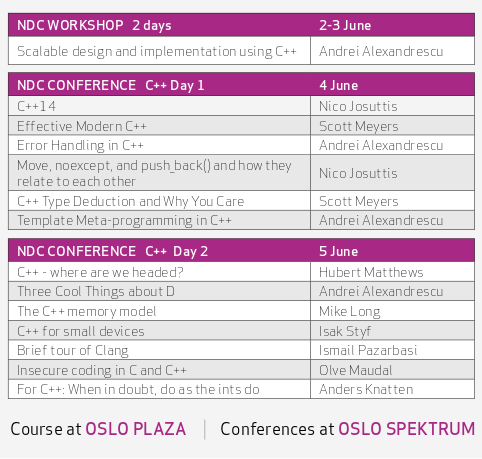
First of all, there’ll be no less than 13 talks, by Nico Josuttis, Scott Meyers, Andrei Alexandrescu, Hubert Matthews, Mike Long, Isak Styf, Ismail Pazarbasi, Olve Maudal, and myself. In addition, Andrei Alexandrescu will give a two day workshop. Here’s the full list:

ndc

See the full agenda at ndcoslo.com, especially Wednesday and Thursday. I’ll be talking about ints. If you think that sounds like a narrow topic, rest assured there’ll be a char too! Oh, and a secret tip, if you’re a member of Oslo C++ Users Group, contact me for a discount!

If you enjoyed this post, you can subscribe to my blog, or follow me on Twitter.

CppQuiz.org officially launched!


The Story (you can skip this part)

Back in April I went to the excellent ACCU 2013 conference. I had been playing with the idea for an online C++ quiz for a while, but decided I didn’t have the time to do it. Then, after a few glasses of wine at the conference dinner and a few more Bath Ales in the bar, I went to my room to get some sleep. But it couldn’t hurt to do a little bit of coding, could it? Add to that the train to London next day, and the plane to Oslo, and the first version of CppQuiz.org was born.

I spent a few more days on it this summer, and since then it has been functionality complete (enough) and stable, so today I removed the “beta” header. I also realised I had forgotten to blog about it, which is kind of silly. How to market a quiz about C++? What about on your own C++ blog?

What is it

CppQuiz.org is (as you might have guessed by now) an online C++ quiz. Each question is a full C++ program, and you are to figure out what its output is. I stole this format from Olve Maudal‘s pub quizzes, but with one major difference: While his quizzes are about what happens on his computer (which is very interesting for a more interactive format), CppQuiz.org asks about what the standard mandates the output to be. If the example code doesn’t compile, or has unspecified/undefined behaviour, you answer that.

The site will just keep throwing questions at you (training mode), optionally giving you a hint and finally give you a full explanation of the answer, with references to the C++11 standard. If you want, you can however start a new quiz (quiz mode), and get a fixed number of questions. At the end you get a score, and a link to give your friends to see if they can beat you. Neither mode requires you to register or log in.

How you can help

If you like the quiz and want to help, there are many ways to do so:

Thanks guys!

Finally I wish to thank a few people. Olve Maudal gives the world’s best C++ pub quizzes, and was my biggest inspiration for creating the site. He also has a fascinating, deep understanding of C and C++, and is an all-around great guy. He even sent me all his C++ quiz material to use for inspiration. See, I told you he is a great guy.

Several people have also contributed their own questions. KrzaQ2 did several, Lars Storjord and others also did. Mikael Kilpeläinen and Fernando Cacciola sent me some of their material. Jon Jagger, Peter Sommerlad, Björn Fahller and several other ACCU members provided good feedback. (I do hope you’re an ACCU member?) Oh, and Webfaction is a highly recommended hosting company. They don’t sponsor me or anything, but their customer service is the best.

Now go take the quiz!

If you enjoyed this post, you can subscribe to my blog, or follow me (@knatten) or @CppQuiz on Twitter.

Prefer Using References With Range Based For Loops


Now and again I see people forgetting the & in range based for loops, like this:

    for (auto a : a_vec)
    {
    }

What some people seem to forget, or don’t know, is that this creates a copy of the element for each iteration. Unless you actually need a copy, there is no need to perform it. And if the objects you are copying are any larger than a built-in type (integer, pointer etc.), there is a potential performance penalty. So by default, do this instead:

    for (const auto& a : a_vec)
    {
    }

Notice the &? Now you get a reference instead of a copy, which is typically cheaper. Here is the full program:

#include <iostream>
#include <vector>

using namespace std;

class A
{
public:
    A() = default;
    A(const A& rhs) { cout << "Copy" << endl; }
};

int main()
{
    vector<A> a_vec(2);

    cout << "Range based for without &" << endl;
    for (auto a : a_vec)
    {
    }

    cout << "Range based for with &" << endl;
    for (const auto& a : a_vec)
    {
    }
}

And its output:

Range based for without &
Copy
Copy
Range based for with &

Afterthought: Why?

Why are people doing this? It might be that people are used to iterating with iterators, where you get a cheap copy of the iterator, not the actual object:

    for (auto a = a_vec.cbegin(); a != a_vec.cend(); ++a)
    {
    }

Here, a is an iterator, not the actual object, so copying it is inexpensive.

As usual, the code for this blog post is available on GitHub.

If you enjoyed this post, you can subscribe to my blog, or follow me on Twitter.

Fighting FUD – Introducing C++11 to Legacy Programmers


I’m at the ACCU 2013 conference, and this morning Bjarne Stroustrup held a keynote about C++11. One of his points was that full adoption of C++11 will take some time, due to compilers, libraries etc. lagging behind, but also due to many programmers not wanting to use new things in general. What can you do about it? Bjarne briefly suggested we fight the FUD by starting to introduce the very simplest features that just make everyone’s lives easier. Here is my take on that.

Simple feature #1: Uniform Initilaization

Initializing containers used to be painful. For example, initializing a vector of ints required a long list of push_backs, or something like this:

    int tmp_v[] = {1, 1, 2, 3, 5, 8};
    vector<int> old_v(tmp_v, tmp_v + sizeof(tmp_v) / sizeof(tmp_v[0]));

Now however, we can do this:

    vector<int> new_v = {1, 1, 2, 3, 5, 8};

Even the most hard-core “I don’t need all that new stuff” legacy programmer will appreciate that. Btw, I think this is especially useful in unit tests, where you typically initialize a lot of data manually. (Those legacy programmers probably “don’t need all that new unit testing stuff” either, though.)

This becomes even more important when you have more complex containers:

    vector<pair<int, string>> ints = {{1, "one"}, {2, "two"}};

Simple feature #2: Type deduction

Let’s say we want to print out that vector of pairs from the previous example. This is how you’d do it in C++03:

    for (vector<pair<int, string>>::const_iterator it = ints.begin(); it != ints.end(); ++it)
    {
        cout << it->first << ":" << it->second << " ";
    }

That vector<pair<int,string>>::const_iterator is a bit cumbersome, right? Well, in C++11 we can let the compiler figure out the type for us:

    for (auto it = ints.begin(); it != ints.end(); ++it)
    {
        cout << it->first << ":" << it->second << " ";
    }
    cout << endl;

Note that auto is resolved compile-time, this is not dynamic typing. But we can do even better:

Simple feature #3: Range based for

    for (auto& elm : ints)
    {
        cout << elm.first << ":" << elm.second << " ";
    }
    cout << endl;

This really is as simple as it gets. Notice that the type of elm is no longer an iterator, it is a reference to the element. This means you no longer have to dereference the iterator, and things become even simpler. (Not having to dereference is a bigger issue when the containers store pointers, and you end up doing (*it)->member.)

(Not so?) simple feature #4: Lambdas

The first three features should be fairly simple to convince anyone to use. I would however argue that it should be fairly simple to make an argument for the simplest uses of lambda functions too.

Lets say we want to find an element in that vector<pair>. To do that, we need a predicate function/functor. In C++03, we would need to either do something with std::bind_1st / std::bind_2nd, or write our own predicate like this:

    class CompareString
    {
        public:
            CompareString(string s) : s(s) {}
            bool operator()(const pair<int,string>& p) { return p.second == s; };
        private:
            string s;
    };

    auto it = find_if(ints.begin(), ints.end(), CompareString("two"));

We are not really interested in making that class. All we want is the content of operator(). Wouldn’t it be nice if we could just paste that code directly in the call to find_if? Something like this?

    auto it2 = find_if(ints.begin(), ints.end(),
        bool operator()(const pair<int,string>& p) { return p.second == "two";});    

With lambdas, we can:

    auto it2 = find_if(ints.begin(), ints.end(),
        [](const pair<int,string>& p) { return p.second == "two";});    

For the purpose of this article, [] can be read as “lambda function follows:”. Notice that we don’t even have to specify the return type, as it can be deduced by the compiler.

Conclusion

That’s it! Just a few simple things to start introducing in you code base, to fight the FUD and convince the legacy programmers that C++11 is nice. (And sorry if this blog post feels a bit rushed, I wrote it during lunch at ACCU 2013. Now I’m off to see my friend Mike Long talk about legacy code base restoration projects.)

As usual, the code for this blog post is available on GitHub.

If you enjoyed this post, you can subscribe to my blog, or follow me on Twitter.

How to avoid includes in headers


I have now written twice about why you should minimize the use of include in header files. As one reader on Reddit politely put it (“crap article”), it is about time I write a post about how to do that.

There is mainly two things you can do:

  1. Reduce the number of headers you include.
  2. Reduce the contents of those headers.

1: Reducing the number of includes

Why do you need includes in the header in the first place? When you compile a file that includes header A, all the names that are used in header A need to be defined. So if header A uses an name defined in header B, header A should include header B (or else anyone who includes A will have to include B as well).

What do I mean by “using” a name then? Basically everything that mentions the name, except as a pointer or reference. Some examples of using a name:

SomeClass f; //Creating an object
some_function(); //Calling a function
class Derived : public SomeClass; //Inheriting from a class

Some examples of mentioning a name but not using it (only needs access to a declaration, not the definition):

SomeClass* f1; //Declaring a variable of pointer type
SomeClass& f2; //Declaring a variable of reference type

As soon as you want to use those though, they must be completely defined:

f1->function(); //Needs definition
f2->member; //Needs definition

Also note that the new type of enum, (enum class) only needs to be declared to be used, as long as you don’t actually mention its value:

SomeEnum e; //Declaring a variable of oldschool enum type needs definition.
SomeEnumClass e; //Declaring a variable of newschool enum type does not need definition...
SomeEnumClass e = SomeEnumClass::VALUE; //...but using a value does.

So given this knowledge, how do we reduce the number of includes in headers?

The first thing to do is to make sure you only include what is necessary to get the header file to compile. If you have a class definition in class.h and the implementation in class.cpp, the latter will typically need includes that are not needed by the header, and so should be put in the cpp. A simple way to check that you don’t have any unnecessary includes is to create an empty cpp file that only includes class.h. If it compiles, all the necessary headers are there. Then you can try commenting out includes in class.h and see which ones actually need to be there. Move the rest down to class.cpp.

The next thing to do is to check whether you actually need access to the definitions, or if a declaration will do. Try commenting out one #include at a time, and checking which names the compiler complains about. Then see if you are actually using that name, or if you are merely holding a pointer or a reference to an object of the type. If so, move the include down to the .cpp file, and add a forward declaration. Here’s an example:

#include "stuff.h"

class Ohlson
{
public:
    void doThings(Stuff* stuff);
};

The include stuff.h in not needed, as we never use stuff. Instead, we can use a forward declaration:

class Stuff; //Forward declaration instead of include

class Ohlson
{
public:
    void doThings(Stuff* stuff);
};

In the definition of Ohlson::doThings(Stuff* stuff) however (typically in ohlson.cpp), we probably need access to the definition of Stuff and need to include it.

So one of the things that will reduce the number of includes in headers is using pointers/references instead of values. There are other considerations to design as well though, so I would not advocate moving from values to pointers without considering the full picture.

Another thing that helps is to have the definition of functions in the .cpp file instead of the .h file. This however prevents inlining, so again, use caution.

A final technique that could help is the Pimpl Idiom. Briefly explained, instead of keeping your private members in the header, you keep them in a struct in the .cpp file. This means you don’t need access to their definitions in the header file, and can move their respective includes down to the .cpp file as well.

Reducing the content of includes

The other thing you can do to reduce the negative effects of includes in headers, if you cannot avoid them, is to reduce the content of those included headers. Here are some techniques:

C++ supports several paradigms, but a good recommendation for most is to depend on abstractions instead of implementations. In object oriented programming, this is done by programming to interfaces. C++ doesn’t have an explicit interface concept, but a class with only pure virtual methods is the same thing. Interfaces should also be kept small and focused. This means an interface should be very quick to compile, reducing the pain of having it included in many files. You will however still need to recompile all the files that include it when it changes, but the more focused it is, the fewer files will depend on it.

A generalization of the above is to avoid large inheritance hierarchies, even if you aren’t able to only use pure interfaces.

If you absolutely need to include a file in your header, but it is one that you own, you can reduce the content of that file by applying the techniques mentioned in the first part of this article to that file. (This is just section 1 seen from the other side of the table.)

A less straightforward technique is to be a bit clever with your templates. Templates are usually completely defined in header files, meaning that a change in the implementation triggers a recompile of everything that uses that template. There is however ways to move the implementation of templates out of header files, for instance as in this Dr. Dobbs article. C++11’s extern template can also help reduce compilation time. Avoiding the use of templates completely of course also solves the problem, but there was probably a reason why you wanted them in the first place.

One final technique that cannot go unmentioned is precompiled headers. While I don’t like what they do to dependencies, I consider them a necessary evil in medium to large projects to keep compile-times reasonable. Precompiled headers are very well explained in the first link in this paragraph, but here’s a short version: Headers can take a long time to compile. If they also change rarely, it would be nice to be able to cache them, and this it what precompiled headers does. In Visual Studio for instance, you put these includes in a file conventionally called stdafx.h, and then include stdafx.h in all your cpp files instead of the actual headers you need. The compiler then only has to compile them once. Headers from the standard library are typically placed here, and third party headers are also usually a good fit.

Those are the techniques I could think of, but I am sure I missed some. Which are you favourite ones? Which did I miss? Which of them are silly? Please use the comment section below.

If you enjoyed this post, you can subscribe to my blog, or follow me on Twitter.